开发电脑用的是 windows 系统的,不是所有用户都能把ollma的命令记的很清楚,那么lm studio也是是不错的选择,有超级友善的 UI 界面很直观的管理自己的模型和接口。
第一当然是下载安装lm studio
LM Studio – Local AI on your computer
https://lmstudio.ai/
安装很简单就和普通的软件一样下一步就行
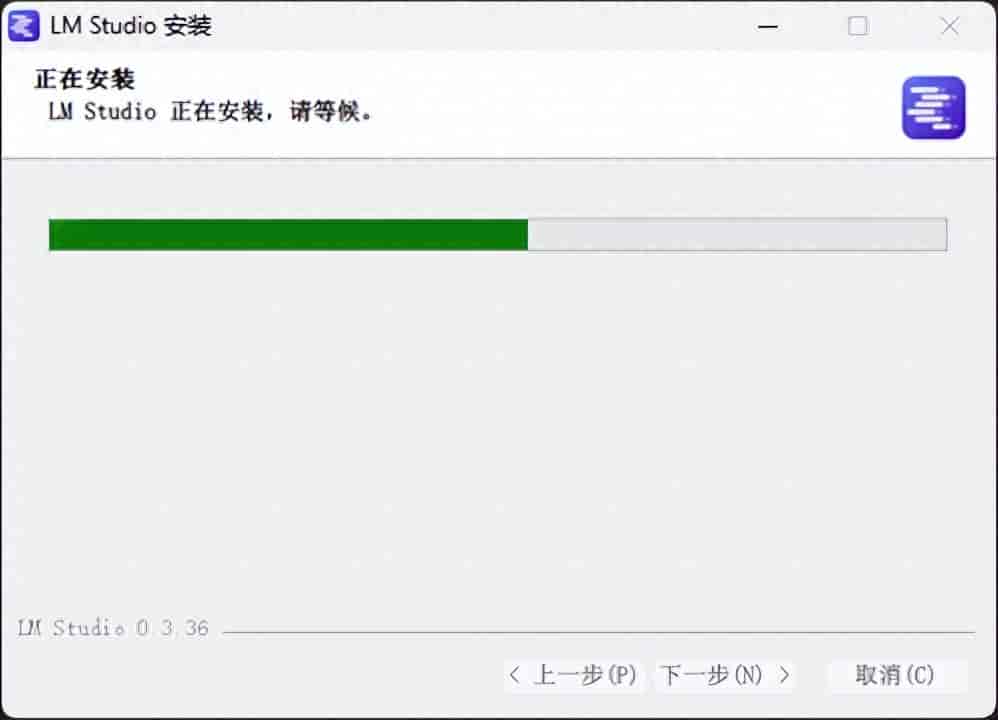
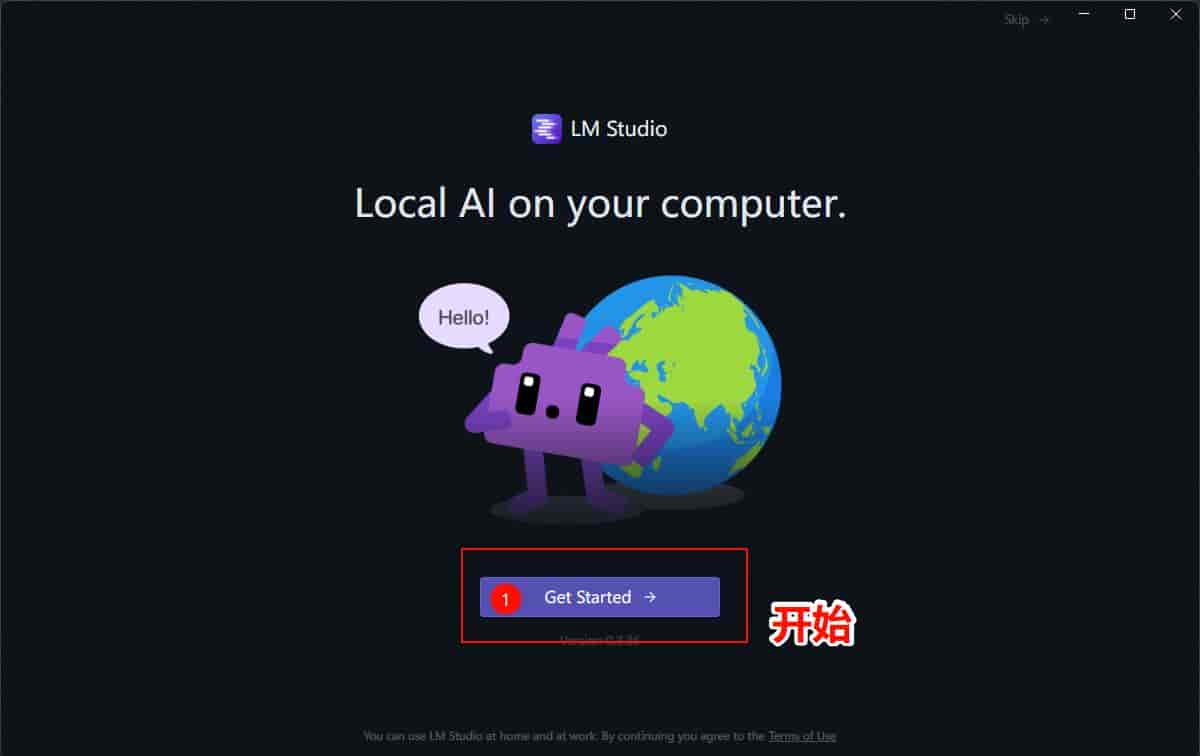
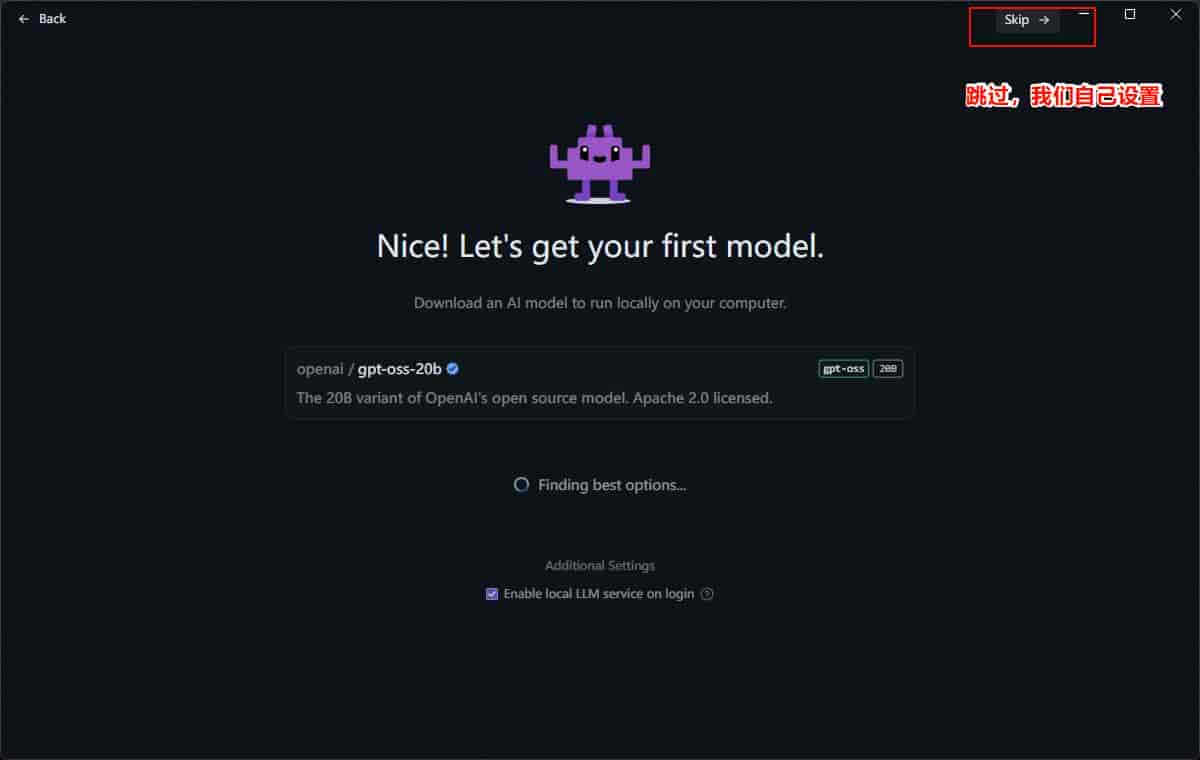
安装完成了目前进入配置修改语言成中文简体
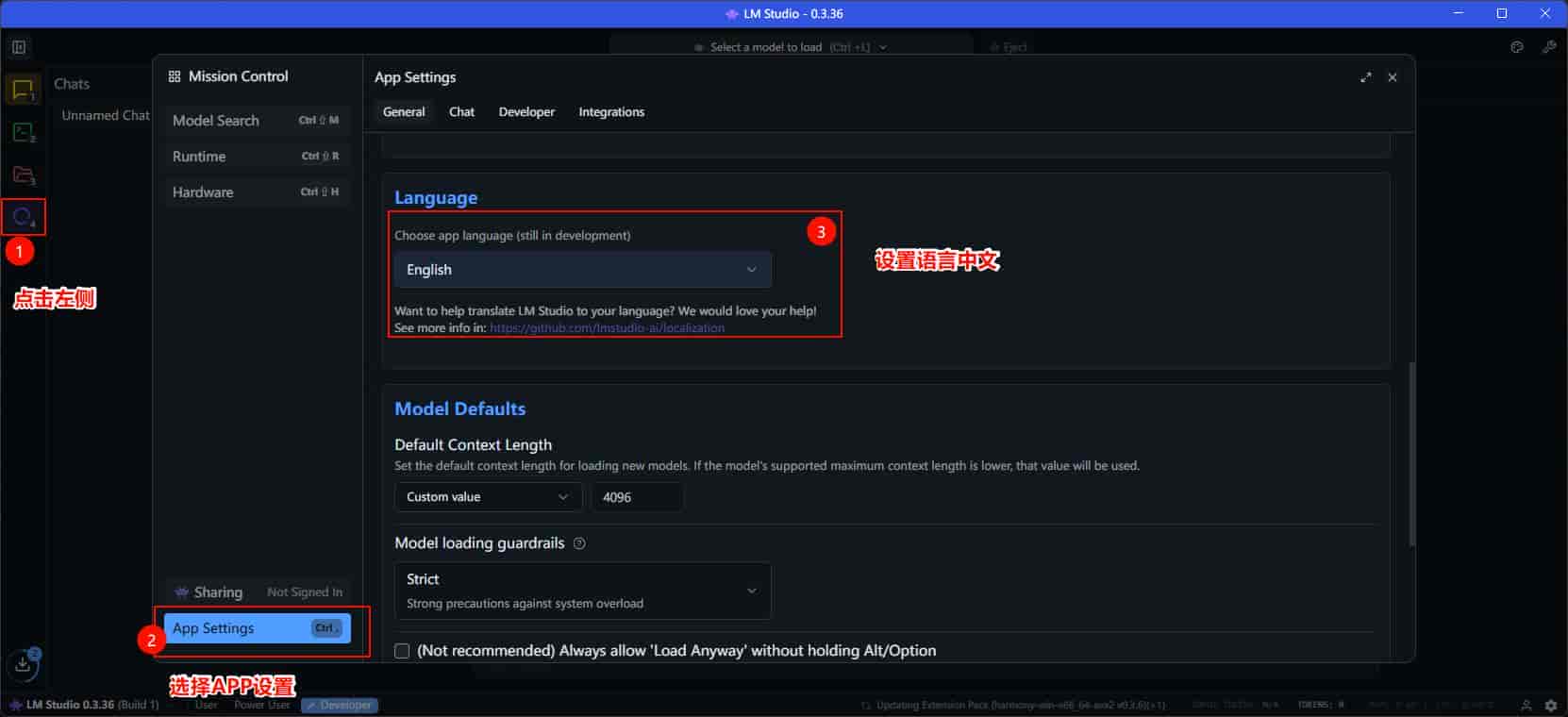
配置模型路径
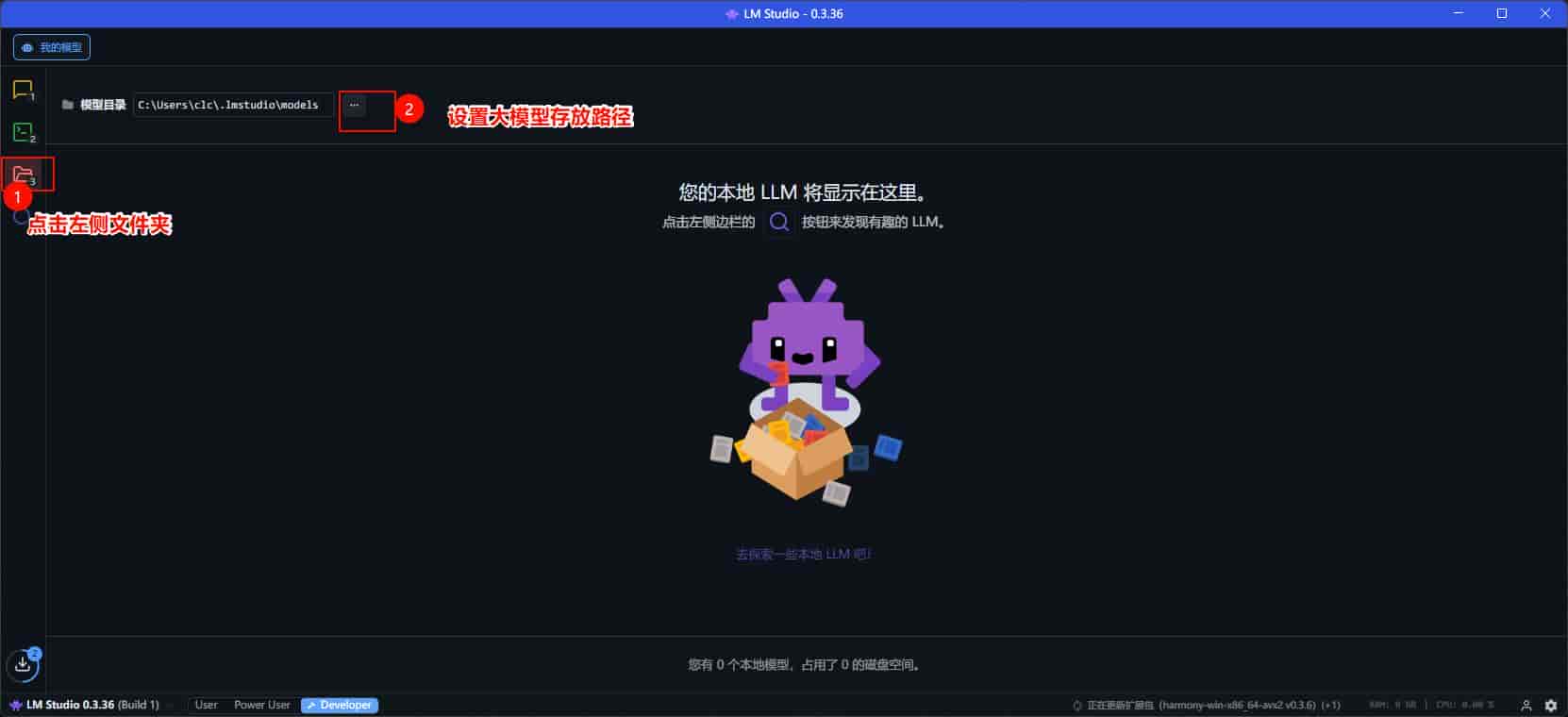
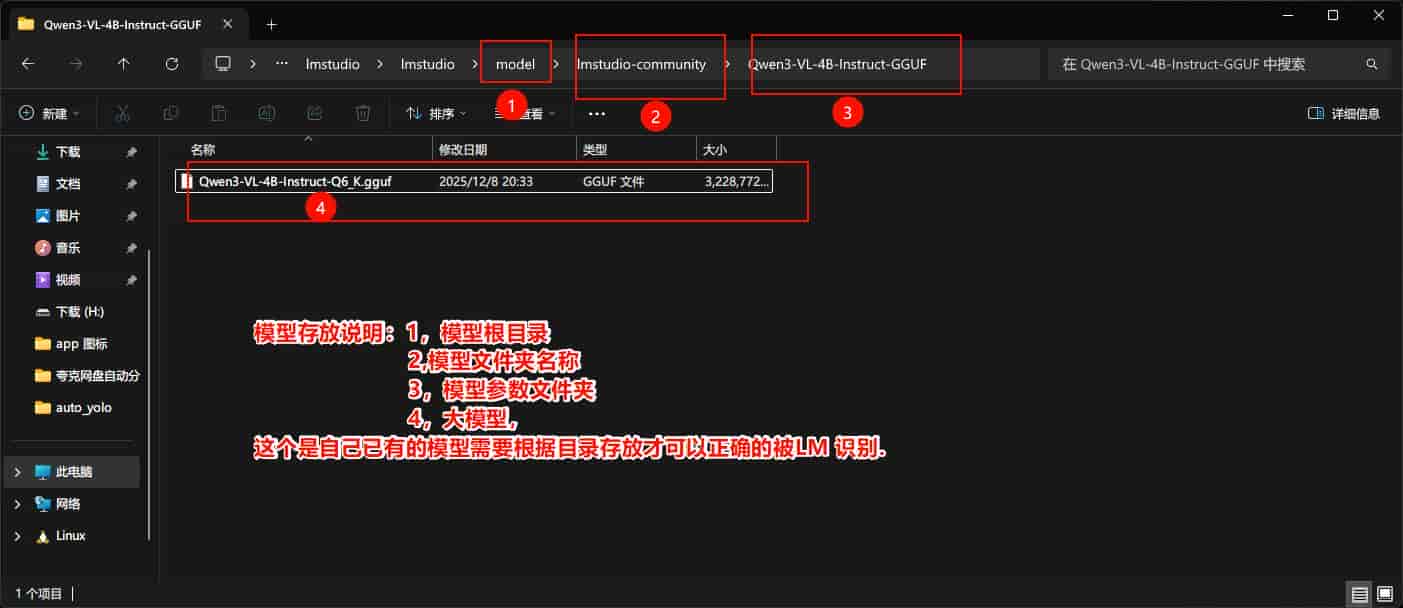
以前的模型文件可以直接配置lm studio
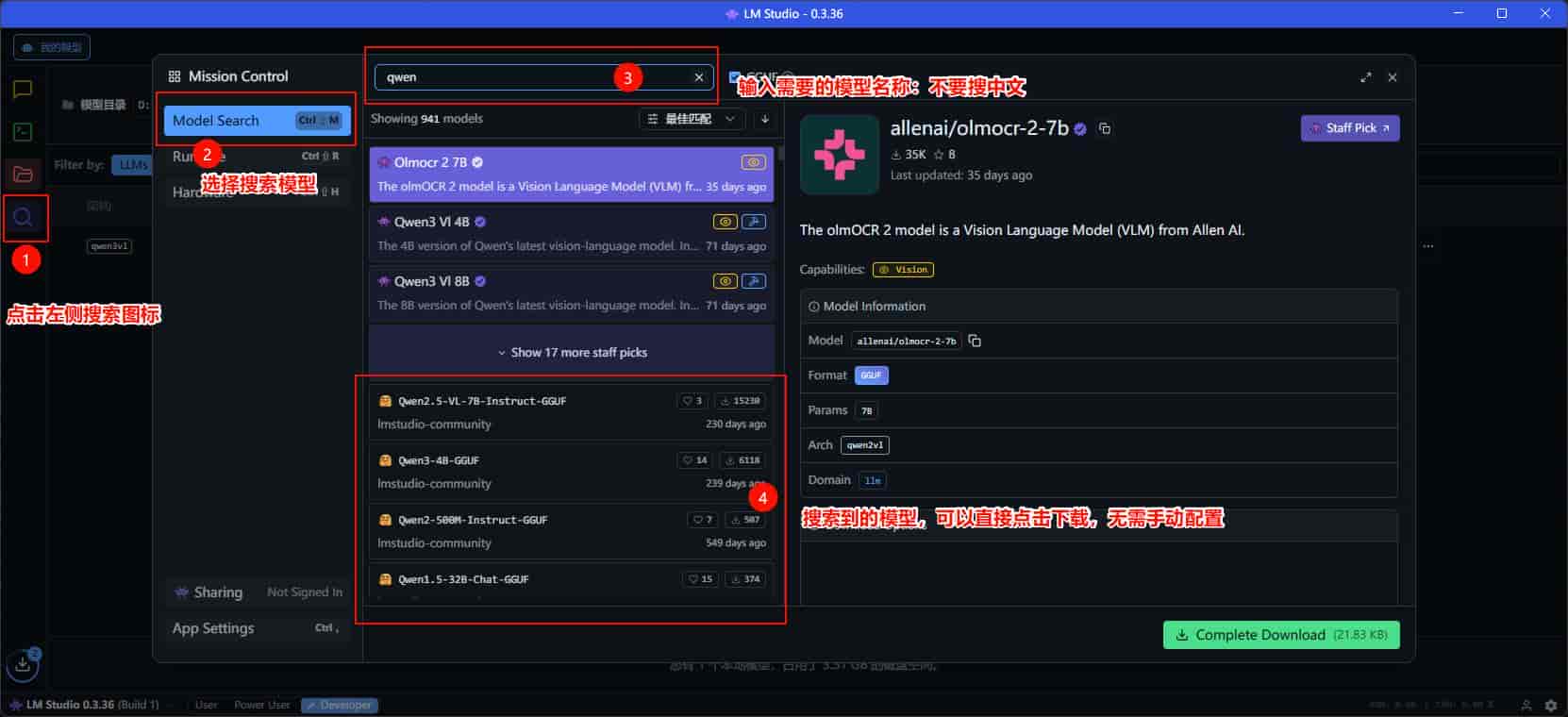
也可以用lm studio 直接下载模型
运行大模型
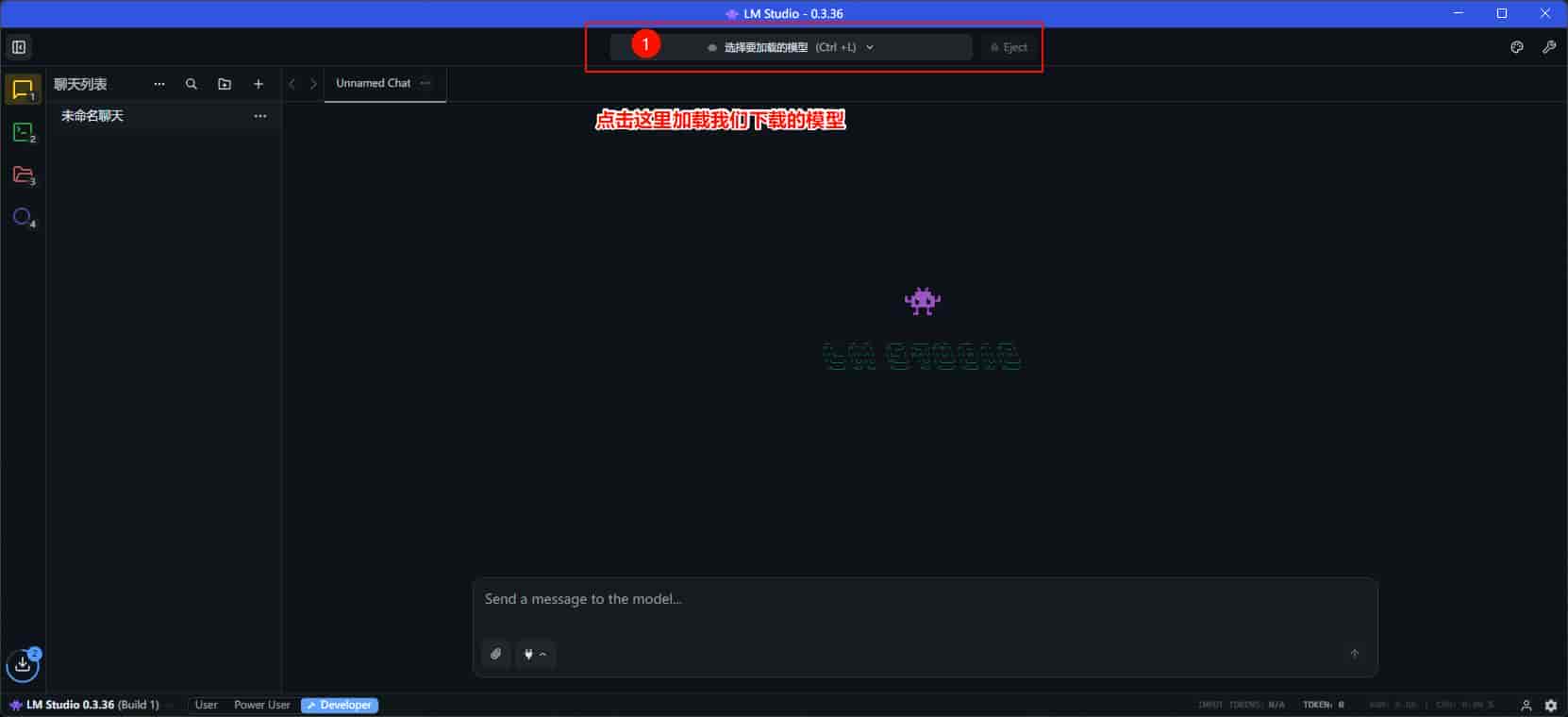
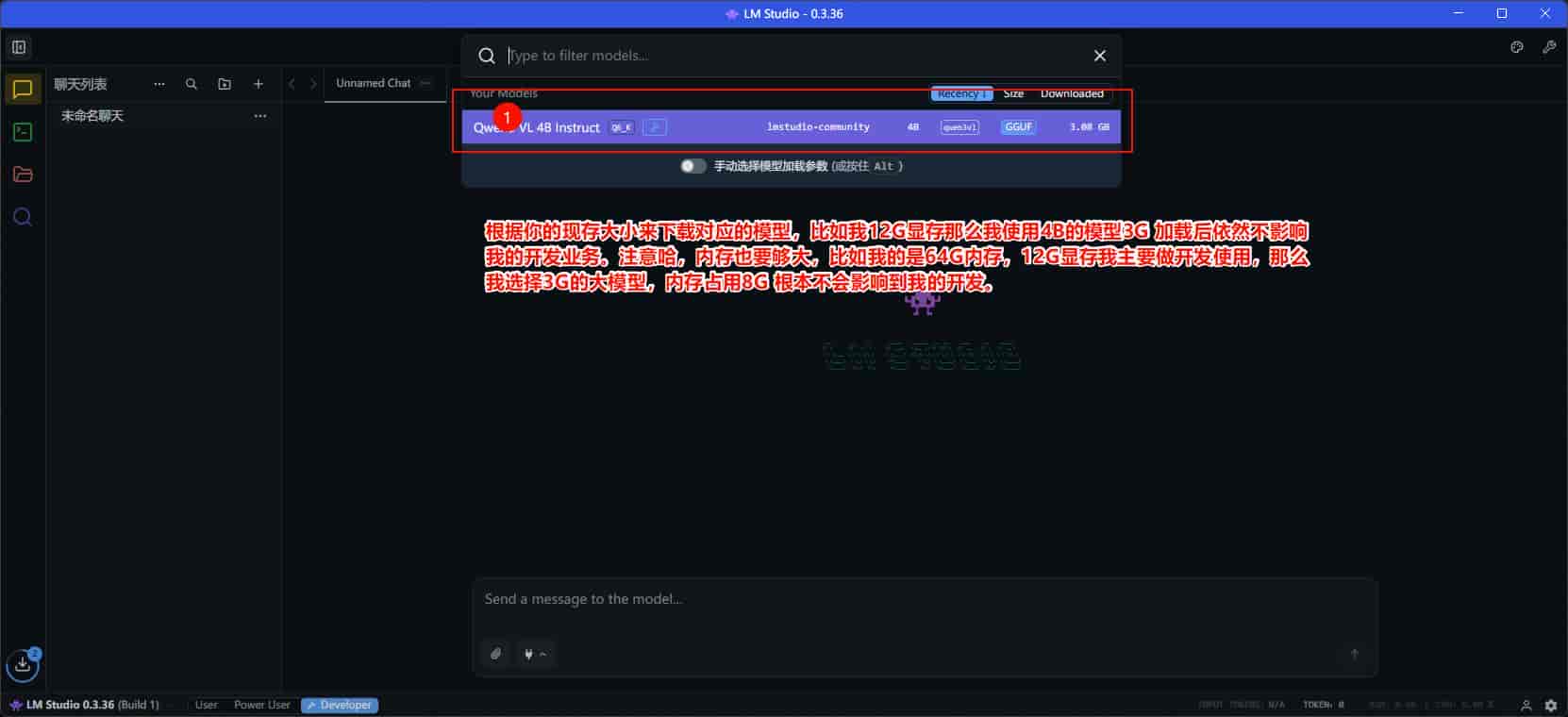
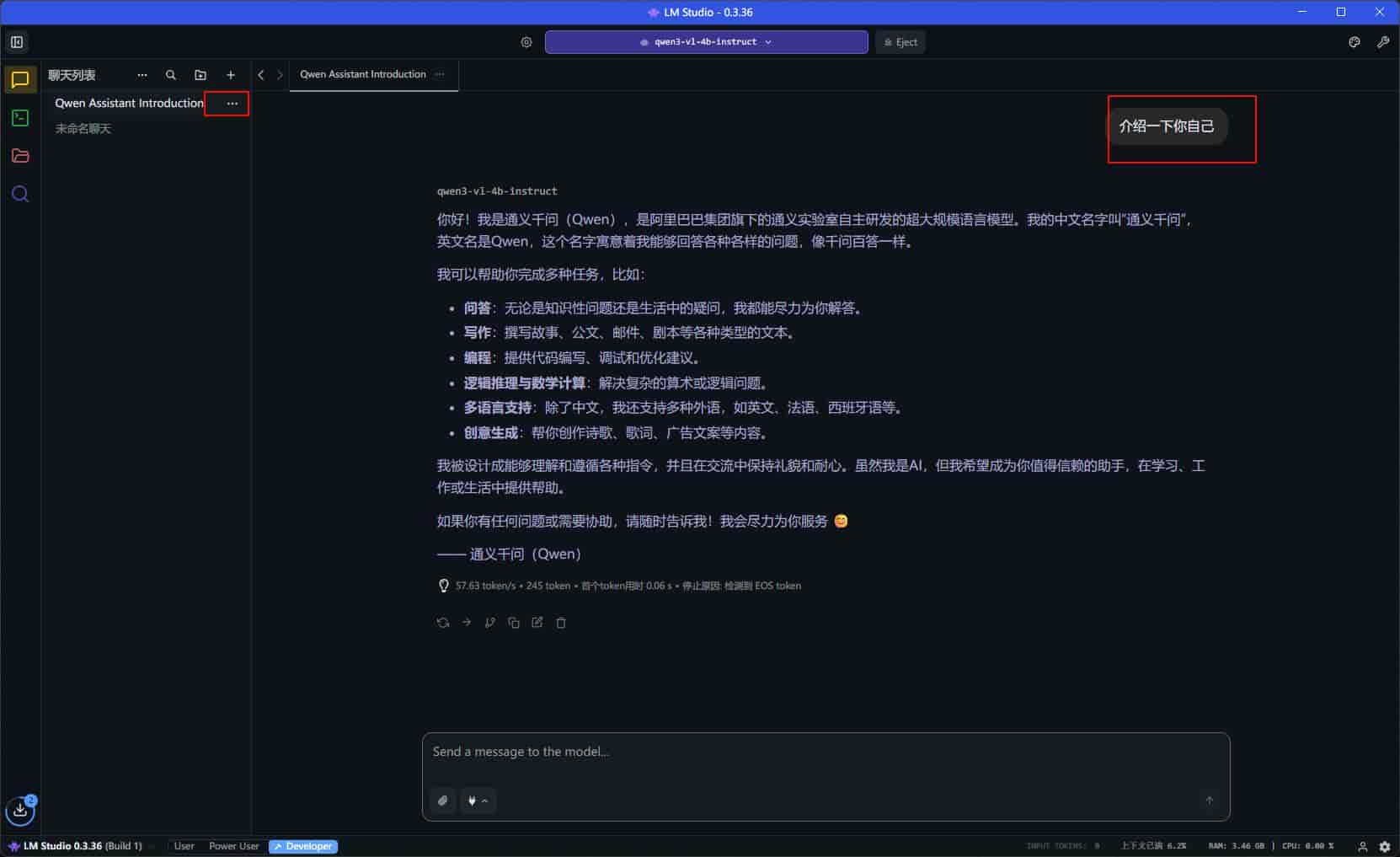
新建对话测试我们的大模型
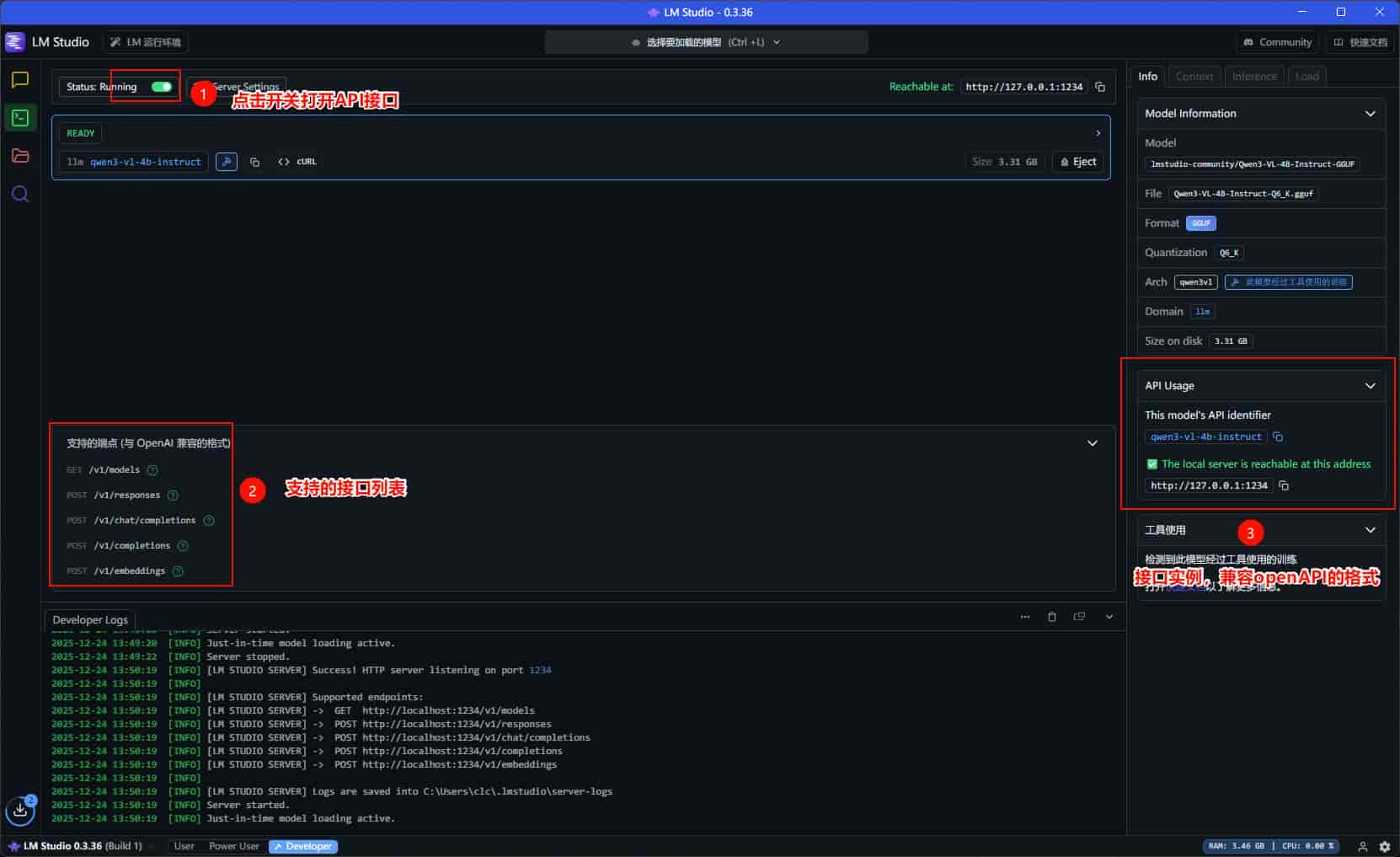
LMstudio 如何开启API,可视化自己的api接口
LM studio 如何配置Agent提示词
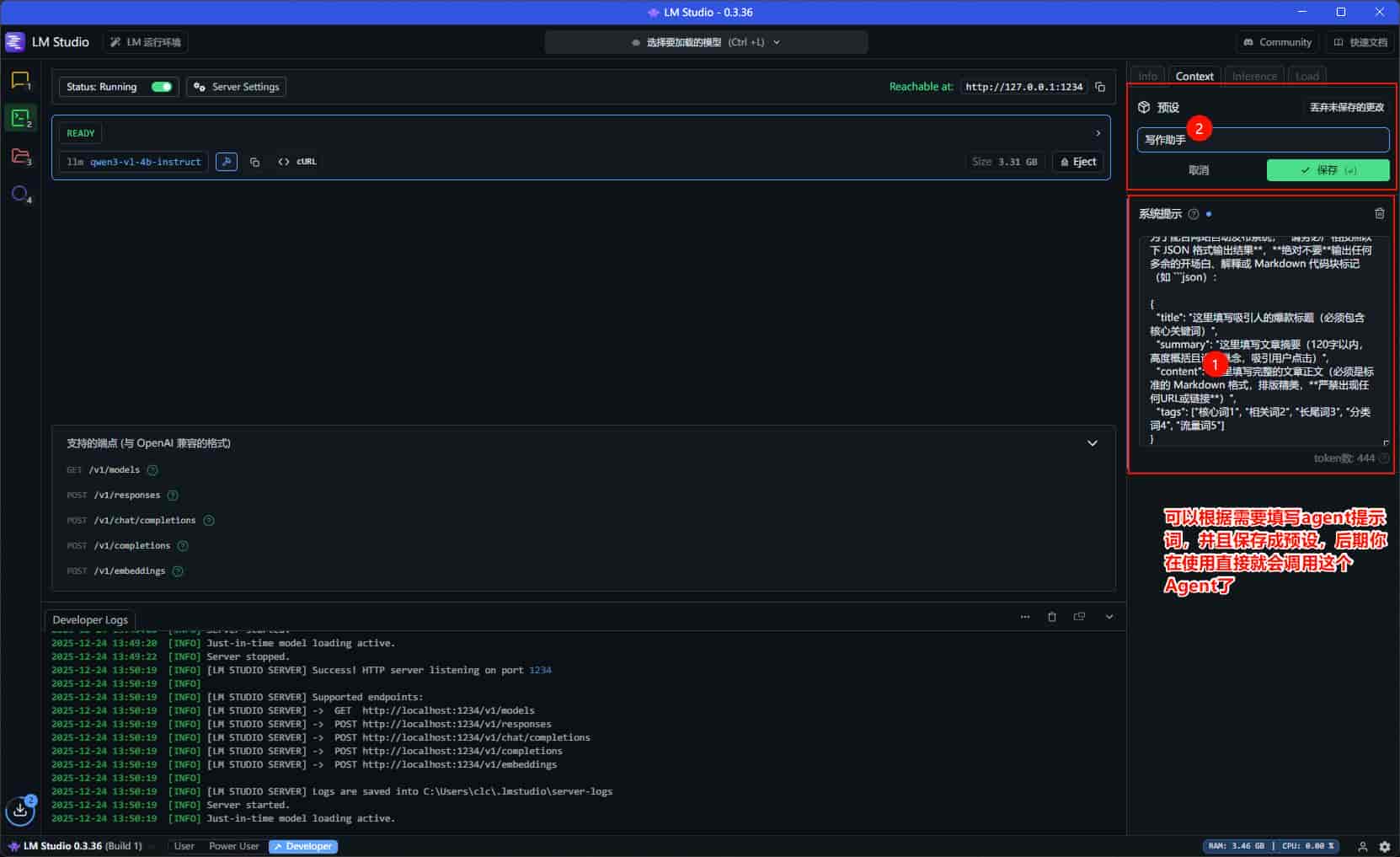
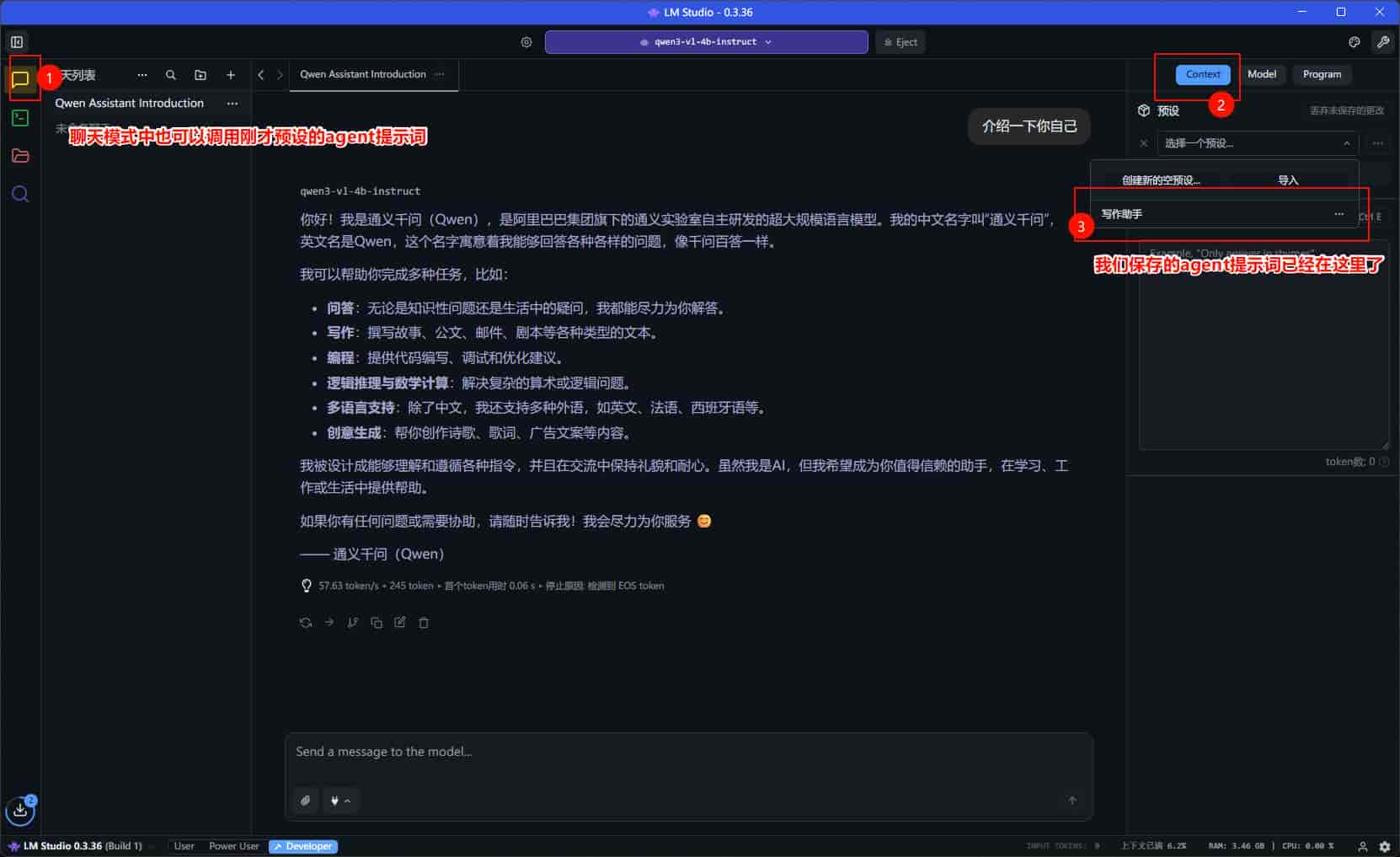
至此Lm studio 安装配置 完成下面我们来看看API接口该如何使用
def _rewrite_with_openai(
api_key: str,
api_url: str,
model: str,
system_prompt: str,
title: str,
content: str,
temperature: float,
max_tokens: int,
) -> Optional[str]:
"""
使用OpenAI API重写文章

该方法通过OpenAI的聊天API对给定文章进行重写,保持核心内容不变,
使用不同的表达方式并提升可读性,最终返回重写后的文章内容。

参数:
api_key: str - OpenAI API密钥,用于身份验证和API调用
api_url: str - OpenAI API基础URL,若不提供则使用默认URL
model: str - 使用的AI模型名称,如"gpt-4", "gpt-3.5-turbo"等
system_prompt: str - 系统提示词,用于指导AI的重写风格和要求
title: str - 原文章的标题
content: str - 原文章的正文内容
temperature: float - 生成文本的随机性参数,范围0-2,值越高内容越多样
max_tokens: int - API响应的最大令牌数,控制生成内容的长度

返回:
Optional[str] - 重写后的文章内容字符串,若失败则抛出异常

异常:
Exception - 当API调用失败、参数错误或其他异常发生时抛出
"""
try:
# 配置OpenAI客户端
client = openai.OpenAI(
api_key=api_key, base_url=api_url if api_url else None
)

# 构建用户提示词,包含原文章标题和内容
prompt = f"""
标题: {title}
正文:
{content}
请根据系统提示词重写这篇文章,保持核心内容不变,但使用不同的表达方式,提升可读性。
"""

# 调用OpenAI聊天API进行文章重写
response = client.chat.completions.create(
model=model,
messages=[
{"role": "system", "content": system_prompt},
{"role": "user", "content": prompt},
],
temperature=temperature,
max_tokens=max_tokens,
)

# 提取并返回重写后的内容,去除首尾空白
return response.choices[0].message.content.strip()

except Exception as e:
logger.error(f"OpenAI重写失败: {str(e)}")
raise
python的脚本
#!/usr/bin/env python3
# -*- coding: utf-8 -*-
"""AI重写业务逻辑"""
import json
import re
from typing import Optional, Dict, Any
from datetime import datetime
from sqlalchemy.orm import Session
import openai
import anthropic
from app.data.models import Article
from app.utils.logger import logger
from config.config import get_config
class AIRewriter:
"""AI文章重写器"""
@staticmethod
def rewrite_article(db: Session, article_id: int) -> Optional[Article]:
"""重写文章"""
try:
logger.info(f"开始AI重写文章,ID: {article_id}")
# 获取文章
article = db.query(Article).filter(Article.id == article_id).first()
if not article:
logger.warning(f"文章不存在,ID: {article_id}")
return None
# 获取AI配置
config = get_config()
ai_type = config["ai"]["api_type"]
api_key = config["ai"]["api_key"]
api_url = config["ai"]["api_base"]
model = config["ai"]["model"]
system_prompt = config["ai"]["system_prompt"]
temperature = config["ai"]["temperature"]
max_tokens = config["ai"]["max_tokens"]
# 检查配置
if not api_key:
logger.error("AI API密钥未配置")
raise ValueError("AI API密钥未配置")
# 根据AI类型选择重写方法
rewritten_content = None
if ai_type == "openai":
rewritten_content = AIRewriter._rewrite_with_openai(
api_key,
api_url,
model,
system_prompt,
article.title,
article.original_content,
temperature,
max_tokens,
)
elif ai_type == "claude":
rewritten_content = AIRewriter._rewrite_with_claude(
api_key,
api_url,
model,
system_prompt,
article.title,
article.original_content,
temperature,
max_tokens,
)
else:
logger.error(f"不支持的AI类型: {ai_type}")
raise ValueError(f"不支持的AI类型: {ai_type}")
if not rewritten_content:
logger.error(f"文章重写失败,ID: {article_id}")
raise ValueError("文章重写失败")
# 解析AI响应
ai_result = AIRewriter._parse_ai_response(rewritten_content)
# 更新文章
if "title" in ai_result:
article.title = ai_result["title"]
logger.info(f"更新文章标题,ID: {article_id},新标题: {ai_result['title']}")
if "content" in ai_result:
article.rewritten_content = ai_result["content"]
logger.info(f"更新文章内容,ID: {article_id}")
article.status = "rewritten"
article.updated_at = datetime.now()
db.commit()
db.refresh(article)
logger.info(f"文章重写成功,ID: {article_id}")
return article
except Exception as e:
logger.error(f"文章重写失败,ID: {article_id}, 错误: {str(e)}")
db.rollback()
raise
@staticmethod
def _rewrite_with_openai(
api_key: str,
api_url: str,
model: str,
system_prompt: str,
title: str,
content: str,
temperature: float,
max_tokens: int,
) -> Optional[str]:
"""
使用OpenAI API重写文章
该方法通过OpenAI的聊天API对给定文章进行重写,保持核心内容不变,
使用不同的表达方式并提升可读性,最终返回重写后的文章内容。
参数:
api_key: str - OpenAI API密钥,用于身份验证和API调用
api_url: str - OpenAI API基础URL,若不提供则使用默认URL
model: str - 使用的AI模型名称,如"gpt-4", "gpt-3.5-turbo"等
system_prompt: str - 系统提示词,用于指导AI的重写风格和要求
title: str - 原文章的标题
content: str - 原文章的正文内容
temperature: float - 生成文本的随机性参数,范围0-2,值越高内容越多样
max_tokens: int - API响应的最大令牌数,控制生成内容的长度
返回:
Optional[str] - 重写后的文章内容字符串,若失败则抛出异常
异常:
Exception - 当API调用失败、参数错误或其他异常发生时抛出
"""
try:
# 配置OpenAI客户端
client = openai.OpenAI(
api_key=api_key, base_url=api_url if api_url else None
)
# 构建用户提示词,包含原文章标题和内容
prompt = f"""
标题: {title}
正文:
{content}
请根据系统提示词重写这篇文章,保持核心内容不变,但使用不同的表达方式,提升可读性。
"""
# 调用OpenAI聊天API进行文章重写
response = client.chat.completions.create(
model=model,
messages=[
{"role": "system", "content": system_prompt},
{"role": "user", "content": prompt},
],
temperature=temperature,
max_tokens=max_tokens,
)
# 提取并返回重写后的内容,去除首尾空白
return response.choices[0].message.content.strip()
except Exception as e:
logger.error(f"OpenAI重写失败: {str(e)}")
raise
@staticmethod
def _rewrite_with_claude(
api_key: str,
api_url: str,
model: str,
system_prompt: str,
title: str,
content: str,
temperature: float,
max_tokens: int,
) -> Optional[str]:
"""使用Claude重写文章"""
try:
# 配置Claude客户端
client = anthropic.Anthropic(
api_key=api_key, base_url=api_url if api_url else None
)
# 构建提示词
prompt = f"""
标题: {title}
正文:
{content}
请根据系统提示词重写这篇文章,保持核心内容不变,但使用不同的表达方式,提升可读性。
"""
# 调用API
message = client.messages.create(
model=model,
system=system_prompt,
messages=[{"role": "user", "content": prompt}],
temperature=temperature,
max_tokens=max_tokens,
)
return message.content[0].text.strip()
except Exception as e:
logger.error(f"Claude重写失败: {str(e)}")
raise
@staticmethod
def get_supported_ai_types() -> list:
"""获取支持的AI类型列表"""
return ["openai", "claude"]
@staticmethod
def _parse_ai_response(response: str) -> Dict[str, Any]:
"""解析AI响应,提取标题和内容"""
try:
logger.info(f"开始解析AI响应: {response}")
# 移除可能的前后空格和换行
response = response.strip()
# 第一尝试直接解析整个响应
try:
result = json.loads(response)
logger.info(f"直接解析成功,结果: {result.keys()}")
return result
except json.JSONDecodeError:
logger.info("直接解析失败,尝试提取JSON部分")
# 使用更健壮的正则表达式提取JSON部分
json_pattern = r'{[sS]*?}'
matches = re.findall(json_pattern, response, re.MULTILINE)
if matches:
# 尝试找到包含title和content的JSON对象
for match in matches:
try:
result = json.loads(match)
# 检查是否包含必要的字段
if 'title' in result or 'content' in result:
logger.info(f"提取到JSON对象: {result.keys()}")
return result
except json.JSONDecodeError:
# 尝试修复JSON格式问题
try:
# 找到content字段的位置
content_start = match.find('"content"')
content_colon = match.find(':', content_start)
# 处理content字段
if content_colon > 0:
# 提取content字段的值
content_value_start = content_colon + 1
# 找到content字段值的结束位置(下一个}或,之前)
content_value_end = len(match)
# 如果有}在content_value_start之后,使用第一个}
if '}' in match[content_value_start:]:
content_value_end = content_value_start + match[content_value_start:].find('}')
# 提取content值
content_value = match[content_value_start:content_value_end].strip()
# 如果content值没有用引号包裹,添加引号并转义内部的引号和换行符
if not (content_value.startswith('"') and content_value.endswith('"')):
# 转义内部的引号和换行符
content_value_escaped = content_value.replace('"', '\"').replace('
', '\n').replace('
', '\r')
# 重建JSON字符串
fixed_json_str = (match[:content_value_start] +
'"' + content_value_escaped + '"' +
match[content_value_end:])
logger.info(f"修复后的JSON: {fixed_json_str}")
result = json.loads(fixed_json_str)
if 'title' in result or 'content' in result:
logger.info(f"修复后提取到JSON对象: {result.keys()}")
return result
except Exception as e:
logger.error(f"JSON修复逻辑出错: {str(e)}")
continue
# 如果没有找到包含title或content的JSON,使用最长的匹配
longest_json = max(matches, key=len)
try:
result = json.loads(longest_json)
logger.info(f"使用最长JSON匹配解析成功: {result.keys()}")
return result
except json.JSONDecodeError:
logger.warning(f"最长JSON匹配解析失败: {longest_json[:100]}...")
# 尝试修复最长JSON
try:
# 找到content字段的位置
content_start = longest_json.find('"content"')
content_colon = longest_json.find(':', content_start)
# 处理content字段
if content_colon > 0:
# 提取content字段的值
content_value_start = content_colon + 1
# 找到content字段值的结束位置(下一个}或,之前)
content_value_end = len(longest_json)
# 如果有}在content_value_start之后,使用第一个}
if '}' in longest_json[content_value_start:]:
content_value_end = content_value_start + longest_json[content_value_start:].find('}')
# 提取content值
content_value = longest_json[content_value_start:content_value_end].strip()
# 如果content值没有用引号包裹,添加引号并转义内部的引号和换行符
if not (content_value.startswith('"') and content_value.endswith('"')):
# 转义内部的引号和换行符
content_value_escaped = content_value.replace('"', '\"').replace('
', '\n').replace('
', '\r')
# 重建JSON字符串
fixed_json_str = (longest_json[:content_value_start] +
'"' + content_value_escaped + '"' +
longest_json[content_value_end:])
logger.info(f"修复后的最长JSON: {fixed_json_str}")
result = json.loads(fixed_json_str)
logger.info(f"修复后最长JSON解析成功: {result.keys()}")
return result
except Exception as e:
logger.error(f"最长JSON修复失败: {str(e)}")
# 如果还是解析失败,尝试手动提取title和content
try:
# 手动提取title和content
title_match = re.search(r'titles*:s*("[^"]*"|[^,}]+)', response, re.IGNORECASE)
content_match = re.search(r'contents*:s*([sS]*?)(?:}|,s*})', response, re.IGNORECASE)
title = title_match.group(1).strip('" ') if title_match else ""
content = content_match.group(1).strip() if content_match else response
# 清理提取到的内容
if title and (title.startswith('"') and title.endswith('"')):
title = title[1:-1]
logger.info(f"手动提取成功 - title: {title}, content: {content[:50]}...")
return {"title": title, "content": content}
except Exception as e:
logger.error(f"手动提取失败: {str(e)}")
# 如果所有方法都失败,返回整个文本作为内容
logger.warning("JSON解析失败,将整个响应作为内容处理")
return {"content": response}
except json.JSONDecodeError as e:
logger.warning(f"JSON解析失败: {str(e)}")
logger.info(f"将整个响应作为内容处理,原始响应: {response}")
return {"content": response}
except Exception as e:
logger.error(f"解析AI响应时发生错误: {str(e)}")
raise
@staticmethod
def get_default_models(ai_type: str) -> list:
"""获取默认模型列表"""
model_mapping = {
"openai": ["gpt-3.5-turbo", "gpt-4", "gpt-4-turbo"],
"claude": [
"claude-3-opus-20240229",
"claude-3-sonnet-20240229",
"claude-3-haiku-20240307",
],
}
return model_mapping.get(ai_type, [])© 版权声明
文章由作者编辑发布,如有侵权内容,请通过“联系我们” 的QQ或者邮件进行反馈,我们会及时处理。
相关文章




暂无评论...